How to authorize AI agents on Temporal without storing tokens in workflow history


AI agents can take on work that runs for hours or days. An expense agent might wait overnight for a human’s approval, and any long-running agent has to survive a worker crash partway through. Many teams build these agents on Temporal, a durable execution platform. Temporal records a workflow’s progress at each step, so when the workflow is interrupted, it resumes where it stopped instead of starting over.
That durability creates an authorization problem. The workflow survives the pause, but the access token the agent was holding does not. By the time the next step runs, that token has often expired or been revoked.
Keycard for Temporal is a new integration for Temporal’s Python SDK that closes this gap. Each time an activity (a single step in a Temporal workflow) runs, including on a retry, the agent receives a fresh access token scoped to the one resource that activity needs. This post explains what the integration does, why we built it, and how to add it to your agents. To see a demo of the integration running, watch the workshop recording at the end.
Why durable agents need authorization at every step
Agents depend on durable execution, because agent work pauses for people and fails for ordinary reasons.
In July, Keycard, Docker, and Snyk published Agent Baseline, an open set of security outcomes for running AI agents in the enterprise. An expanded working group has since applied it to the software factory, where AI agents write, test, and ship code. The resulting Secure Software Factory reference architecture defines three levels of autonomy based on who chooses an agent’s next step: a developer (Level 1), a predefined workflow (Level 2), or other agents (Level 3).
Agents on Temporal fit Level 2, where a durable execution layer runs each step, and a runtime authorization service decides what each step can access. The principle that connects them is “the agent proposes, policy authorizes, and infrastructure enforces.” The agent never holds a credential of its own. Instead, it requests access for each step, and a policy outside the agent makes the decision.
In a Temporal deployment, Temporal is the durable execution layer and Keycard is the runtime authorization service. Before this integration, there was no native connection between Temporal and Keycard at the step boundary. Teams had two workarounds, and each gave up a different part of authorization.
The first workaround gives the worker a long-lived API key. Every activity runs with the same standing access, whether it reads a receipt or pays an expense. The Ledger API only sees the worker, not the human who approved the expense, so the audit log can’t show whose approval led to a payment. If the key leaks through a log or a compromised worker, anyone holding it has everything the worker has until you rotate it, which cuts off every workflow at once.
The second workaround passes the user’s token into the workflow as an argument or a signal. Temporal records every input in workflow history and keeps it for the namespace’s full retention period. Unless you encrypt payloads with a payload codec, anyone with access to the namespace can read that token in the Temporal UI. The token’s lifetime also works against the workflow’s: a short-lived token expires while the expense waits overnight for approval, but a longer-lived token brings back the standing-access problem. If you revoke the user’s session while the workflow waits, history still holds the old token, and every retry passes it to the activity again.
In both cases, authorization happens once, at the start, and never again.
We built keycardai-temporal so that Keycard makes the authorization decision at every activity, every time.
How to add Keycard authorization to Temporal activities
Install the package:
pip install keycardai-temporalConsider an expense agent with an activity that pays an approved expense by writing to a ledger. Two pieces of the integration tell the interceptor what that activity needs. The @grant decorator identifies the resource, and the access() function returns the token the interceptor obtained for the current execution.
from temporalio import activity
from keycardai.temporal import access, grant

LEDGER = "urn:ledger:api"

@grant(LEDGER)
@activity.defn
async def debit_ledger(expense_id: str, amount: int) -> dict:
    token = access().access_token  # fresh for this execution only
    ...  # call the Ledger API with the token
    return {"debited": amount}
Replace LEDGER with the resource identifier for your own API. The rest of the activity does not change.
Next, add the interceptor to the worker. A Temporal interceptor runs code around every activity on a worker, and this one runs before each activity body.
from temporalio.worker import Worker
from keycardai.temporal import KeycardInterceptor

interceptor = KeycardInterceptor("https://<zone-id>.keycard.cloud")

async with Worker(
    client,
    task_queue="expenses",
    workflows=[PayExpenseWorkflow],
    activities=[debit_ledger],
    interceptors=[interceptor],
):
    ...
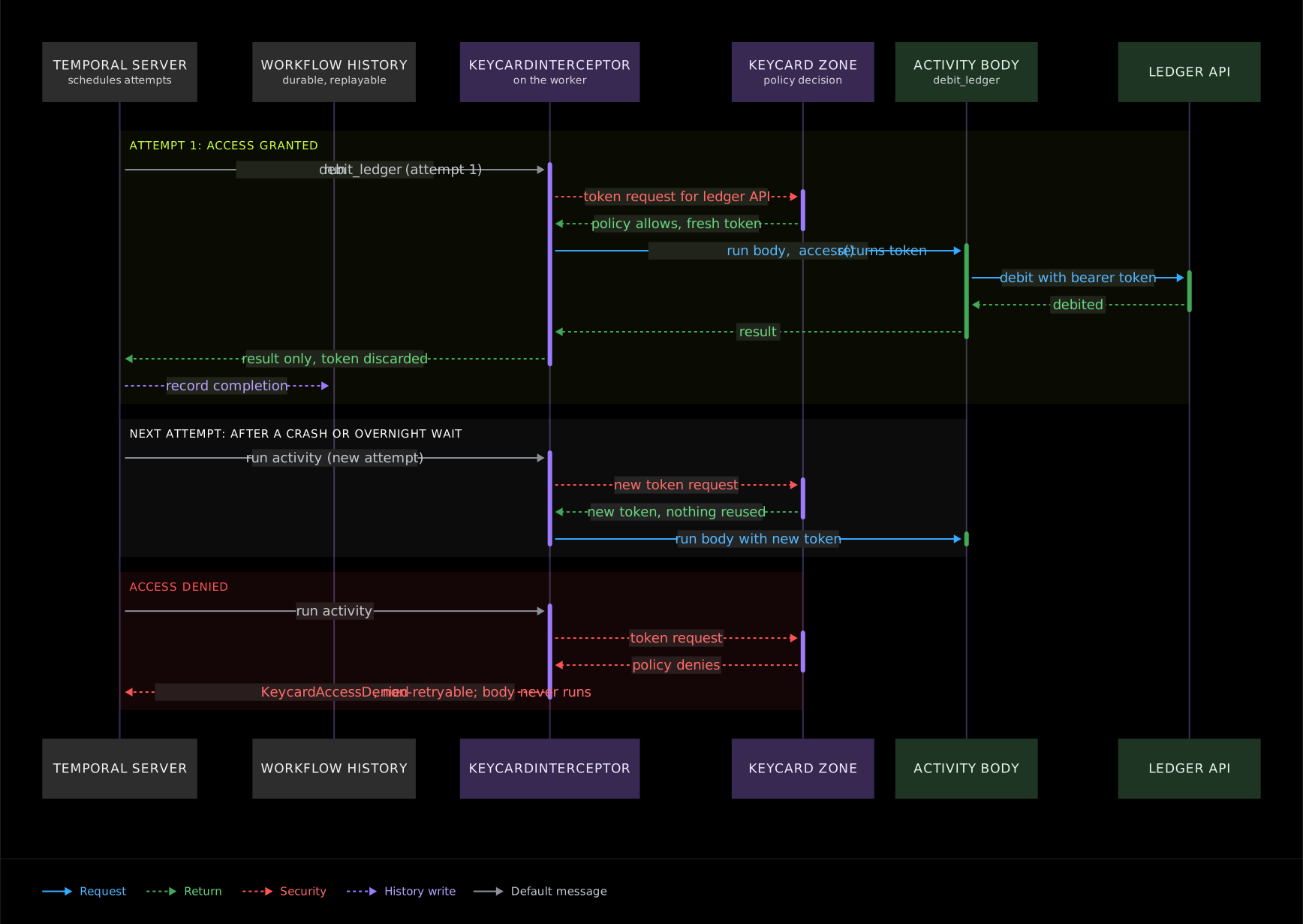
The interceptor reads the worker’s Keycard application credentials from the environment. To supply them directly, pass application_credential. From this point, the sequence is the same for every activity attempt. The interceptor requests a token from Keycard for the declared resource, and Keycard evaluates its policy. If Keycard grants access, the activity body runs with that token. If Keycard denies access, the activity body does not run.
Activities can also act for a specific person rather than for the application. Keycard uses token exchange to issue a token on that person’s behalf. Add subject_from="approver_id" to the grant and configure a subject_token_provider on the interceptor. The integration documentation covers the full pattern.
What changes for your agent
With the interceptor in place, the overnight expense approval from the introduction works differently.
The token lives only in the activity’s execution context. The interceptor never places the token in activity headers, arguments, or return values, so the token never reaches workflow history. The agent keeps its progress without keeping its credentials.
Every attempt goes through authorization again. When the workflow resumes the next morning, the next activity requests access at that moment. A retry after a worker crash receives a new token as well. If you revoke a session overnight, no stored token remains for a replay to reuse.
Denials are final. Suppose your security team spots unusual activity from the expense agent overnight and removes its access to the Ledger API in Keycard. When the workflow resumes the next morning, the payment activity requests a token, and Keycard denies it under the updated policy. Retrying won’t change a policy decision. The interceptor raises a non-retryable KeycardAccessDenied error instead, and the activity body never starts.
A network timeout on the way to Keycard is different, because the same request could succeed a few seconds later. In that case the interceptor raises a retryable error, and the activity’s retry policy determines what happens next. If an activity declares several resources, the interceptor requests all of them before the body runs, and if any single request fails, the body doesn’t run.
Temporal records what the agent did. Keycard decides what the agent can do next at every activity, and records every approval and denial.
See the integration run
We demoed the integration at AI Engineer NYC in a workshop titled “Secure, durable agents with Keycard and Temporal”, alongside Mason Egger from Temporal. Expense Desk, the expense agent built for the workshop, pays approved expenses through a Temporal workflow. During the session, we stopped the worker after the workflow recorded a completed step, waited, and started the worker again. The workflow resumed where it left off, requested a fresh token for the next activity, and did not pay twice.
Thanks to the Temporal team for partnering with us on the workshop. To learn more about durable execution, start with Temporal’s Python SDK docs.
Get started
The integration is open source on GitHub at Python Keycard-Temporal package or available at keycard-temporal on the Python Package Index. The workshop code, including Expense Desk, is at github.com/keycardai/keycard-temporal-workshop. If you have questions, open an issue on either repository.