I Built and Authorized a Planning Agent with MCP and Keycard
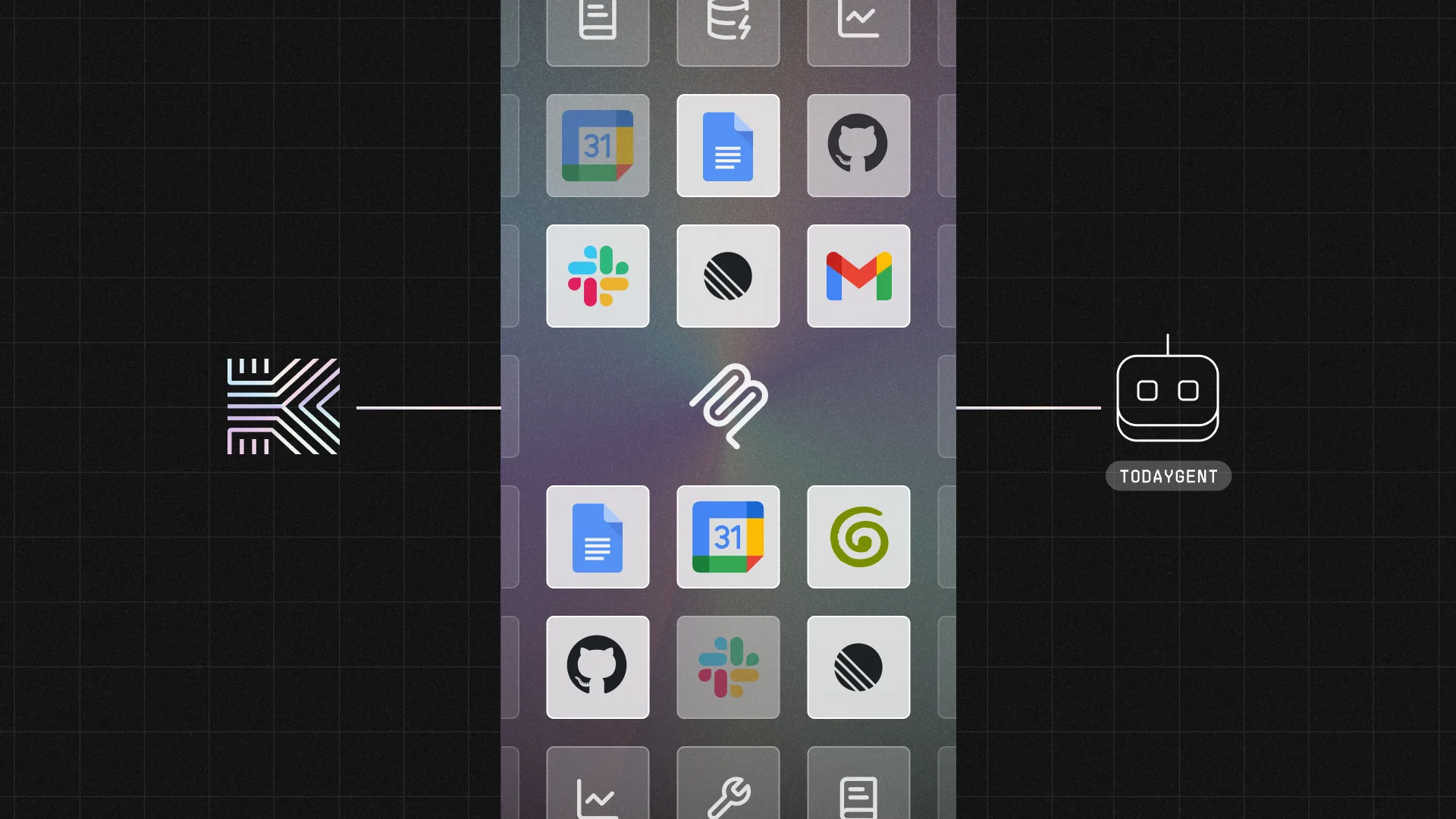

My workday is scattered across many disconnected tools: Google Calendar, Linear, Gmail, Google Docs, GitHub, Slack, and Granola meeting notes. No single view answers “what should I work on right now?”
AI is rapidly changing how we work. MCP servers, agents, and features like Claude Cowork can connect to many sources and help you plan your day through conversation, readily-available MCP servers, and tool integrations. But I have always prioritized and organized my work myself, mostly using a kludge of lists, various project management tools, Slack reminders, Gmail labels, and calendar blocking.
This is always a mess, but it’s my mess. Pre-existing AI agents can help me aggregate data, but I still need to prioritize and analyze everything mentally. That’s not a tool availability problem, it’s a reasoning problem. And it’s always been important to me that it’s my reasoning. I wanted a dashboard that doesn’t just show everything, but thinks about it for me, and thinks about it the way I do.
So I built an AI agent that reads all my work tools and helps me plan my day. But lots of people have done that, so more importantly: I did it without tearing my hair out or agonizing for weeks over the auth parts.
What I Built: “Plan My Today”
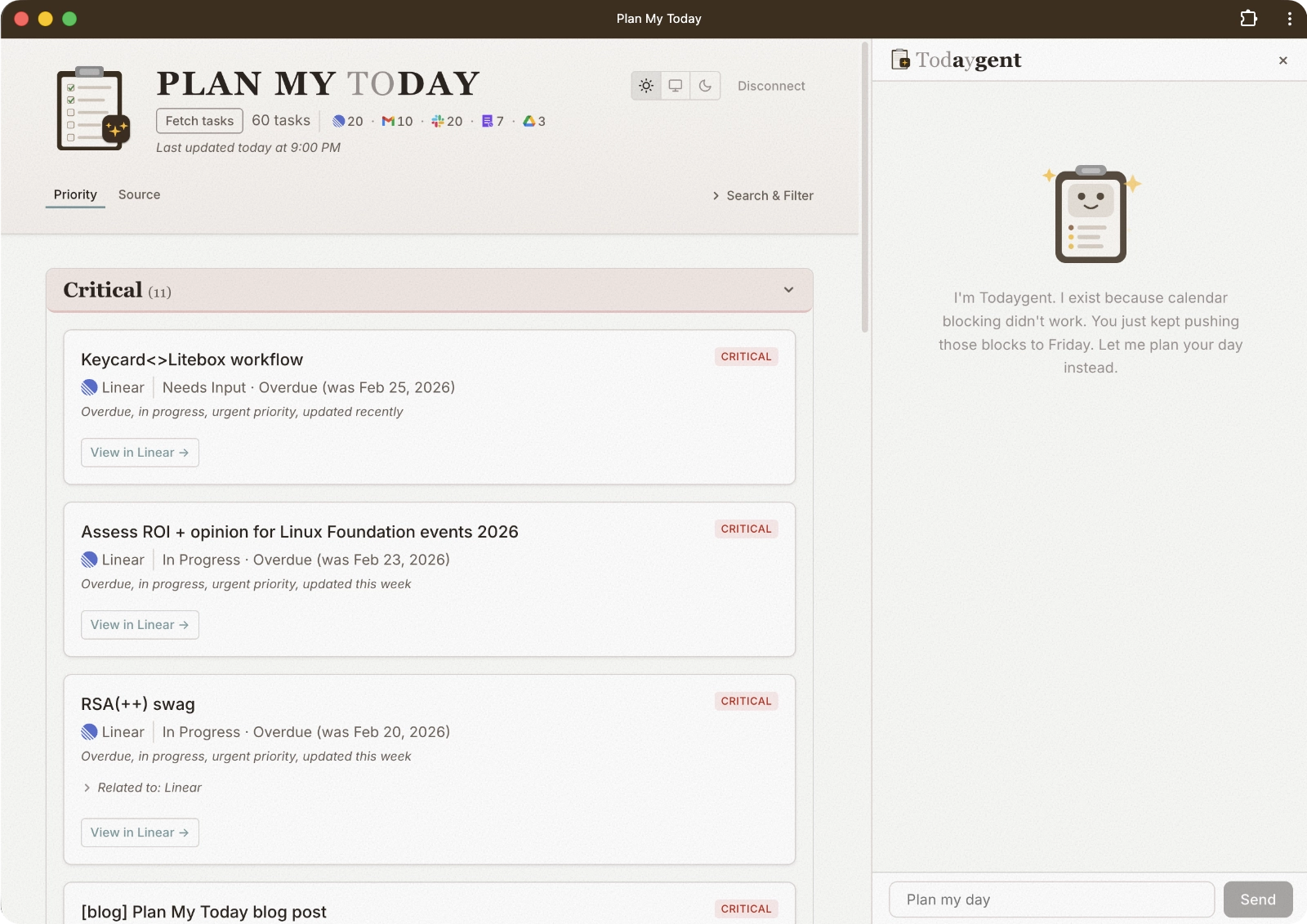
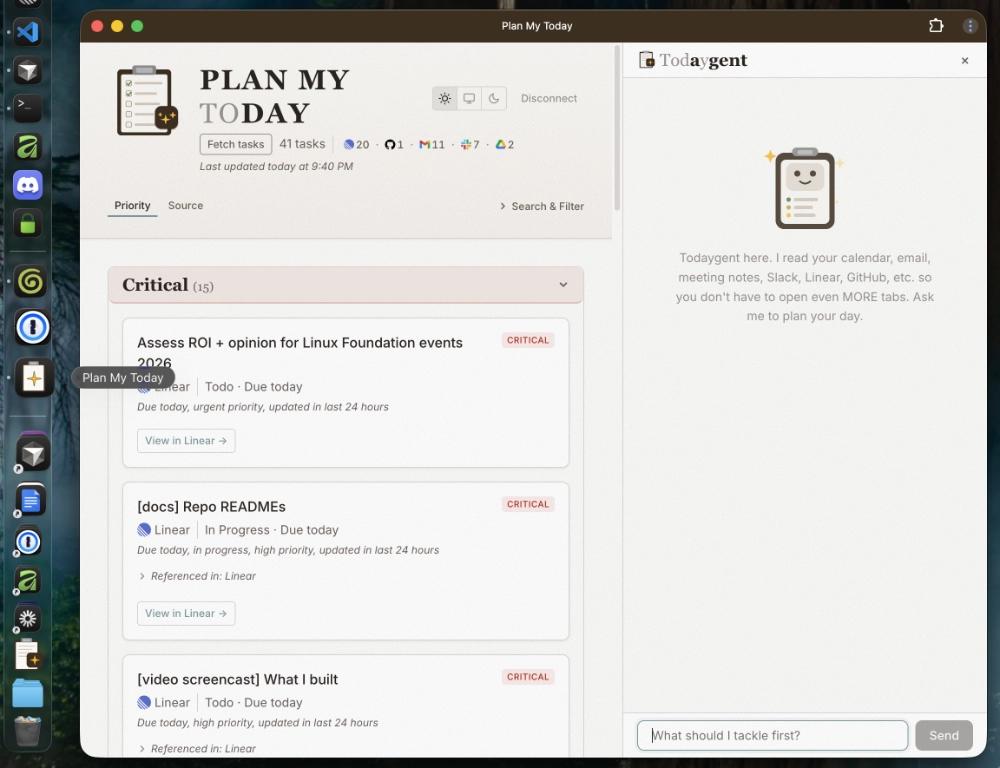
Plan My Today is a daily planning dashboard with an embedded chatbot I call “Todaygent.” The Plan My Today MCP server calls many sources, finds todos, and drops them into a unified, prioritized view. Then Todaygent reasons about my priorities, blockers, and meeting prep using real data.
As much as I spent time defining what Todaygent can do, it was equally important to be crystal clear about what Todaygent can’t do. I’ve always been kind of a masochist about my messy task list… and I like the dopamine hit from manually checking something off. I don’t want an agent to move my tasks around or mark tasks “Done.”
All I want is something smart enough to plan and organize the way I would if I had an abundance of free time (which nobody has, right?). It doesn’t even have to plan more than today. If I’ve learned one thing about my planning habits, it’s that my day changes hour by hour. Any plan I make more than a day in advance flies right out the window. I like managing my own tasks at the source. It’s just the day-planning across incredible tool sprawl I need help with.
Todaygent has read-only access to every data source, and it’s self-aware of its own limitations. It uses a local store to let me dismiss things that can’t be dismissed at the source (like meeting notes or Slack mentions).
I also realized (through rigorous use) that I needed to hoist or reduce priority of specific tasks based on context I had as a human that wasn’t captured in the cold, hard data. The MCP server has tools for each of these actions, and writes to a local JSON store to track my updates. For everything else (Linear, GitHub, Gmail, Calendar, and Slack messages I specifically mark), I own status changes in the source apps myself. Todaygent doesn’t need write access to external tools to plan my day.
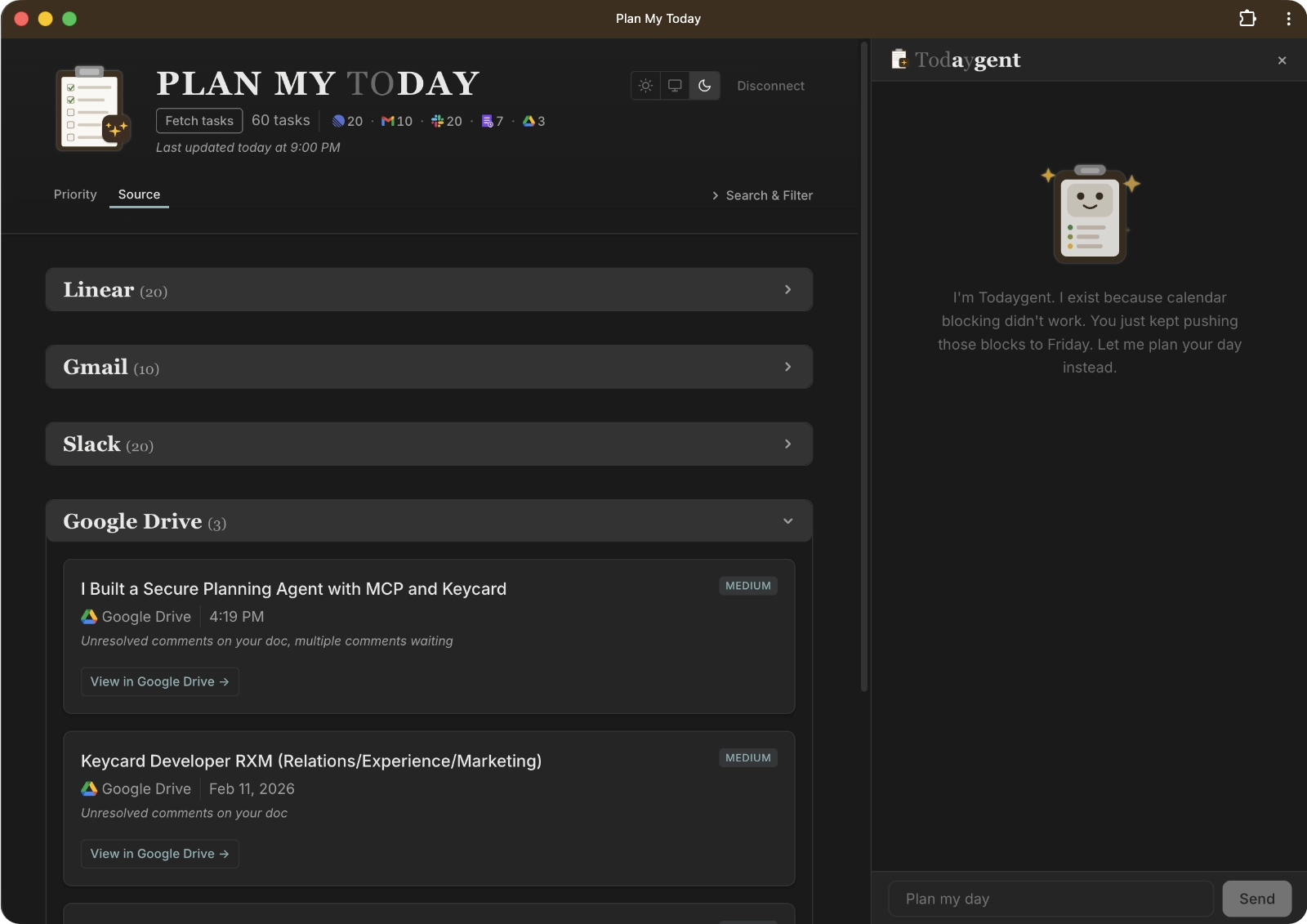
The app dashboard has two views: priority-based (critical/high/medium/low) and source-based grouping, as well as light/dark/system themes, search, filter, and sort.
Architecture Overview
Plan My Today is architected like so:
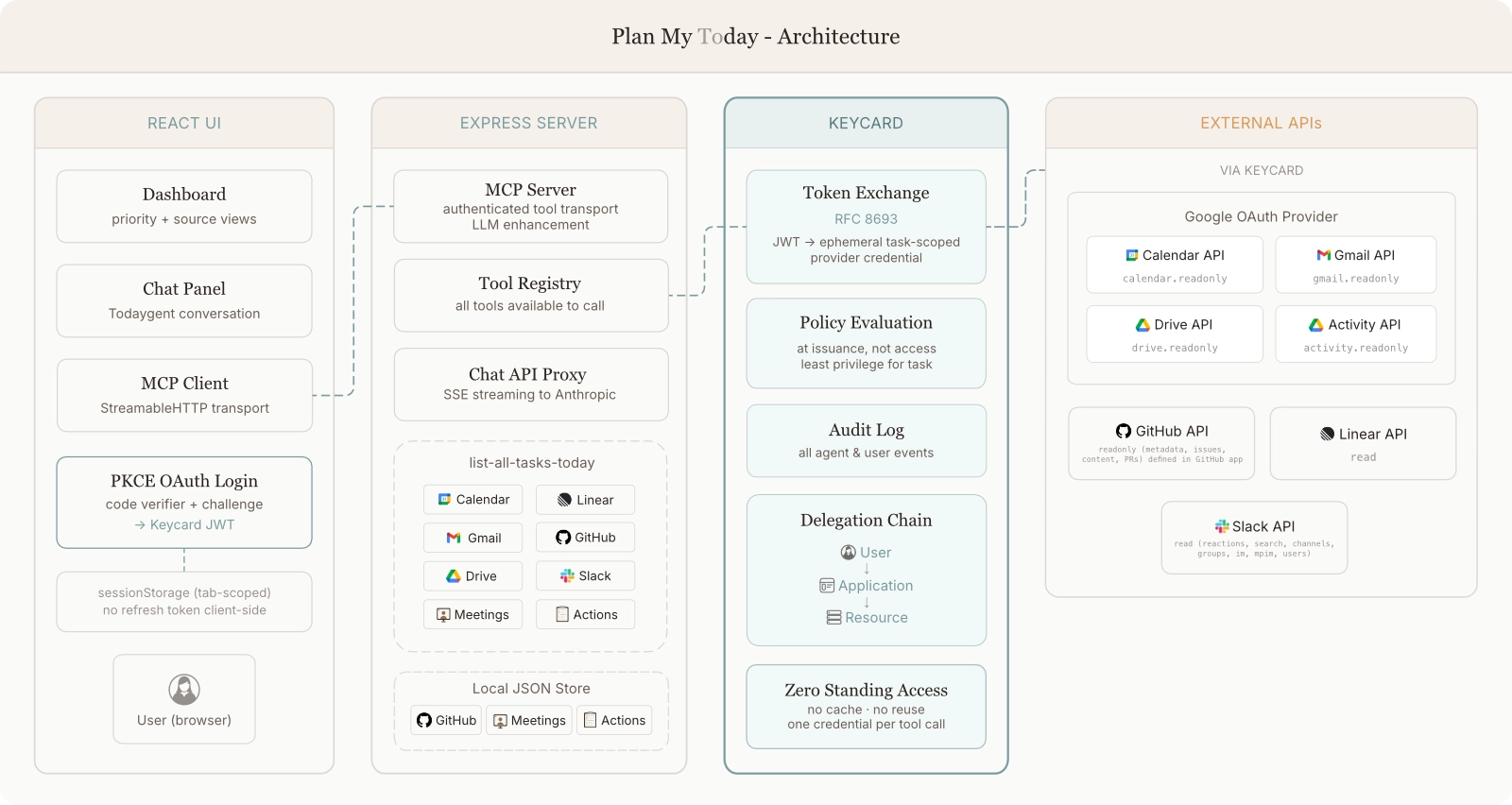
All MCP tools are managed through a central registry. Tools that touch external APIs follow a pattern: Zod schema → async handler → extract authInfo → Keycard token exchange → MCP-formatted response. One file per tool, registered through a TOOL_REGISTRY array.
The Aggregation Tool: list-all-tasks-today
This is it: the tool that pulls from every third party source, scores priorities, and enriches tasks with cross-references.
All sources are fetched concurrently with Promise.allSettled(). Each fetch does its own Keycard token exchange (more on this in the auth section). Each task gets a priority score. Every source has its own scoring algorithm with different base scores and signal weights that I worked hard to tune, and if I notice something off, I tweak the weights and scoring as needed. Todaygent thinks like I do, and when it doesn’t… I force it to. The MCP server cross-references related tasks to help Todaygent and preserve my sanity when I look at the dashboard.
The expensive multi-source fetch (list-all-tasks-today) writes to a local JSON file. A separate tool reads the local task list to give Todaygent and the dashboard the enriched task list on demand. I can trigger another list-all-tasks-today if I add or complete tasks. No tokens wasted.
LLM in the backend
Meeting notes are the messiest source because action items are often casually discussed in subtle ways regex can’t detect. I debugged a bunch of missed items and false positives before adding LLM enhancement. The backend LLM does a second pass to catch conversational, implicit stuff. If I volunteer for (or agree to) something in natural conversation, an LLM can pick that up whereas regex can’t.
The Auth Challenge and How Keycard Solves It
Even AI knows auth is the hard part. These 8 sources with 7 different resources each require token exchanges. This includes scoped grants for Google Calendar API, Gmail API, Drive API, Drive Activity API, Linear, GitHub, and Slack. The browser can’t store API secrets safely. Building custom auth per provider would mean 7 separate OAuth implementations. I have a lot of experience in Identity and Access Management, and I know that’s a ton of work where a lot can go wrong.
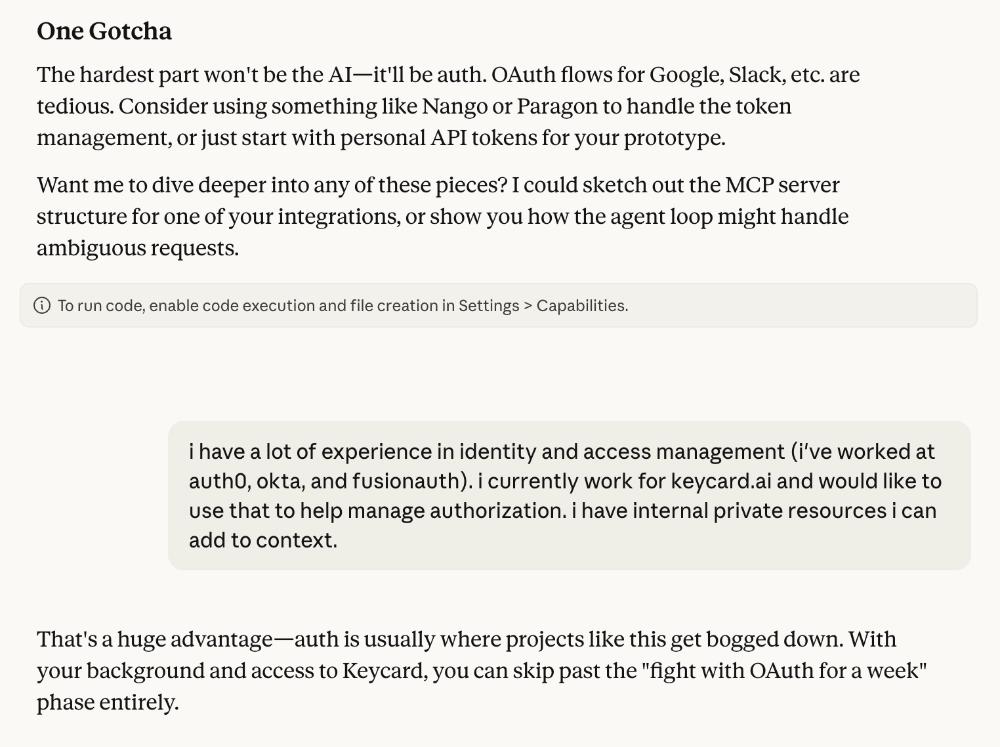
The Solution: Keycard as the control plane for Todaygent
Everything is handled by a single Keycard OAuth login using Google as the identity provider. The browser runs a PKCE flow and the client secret stays server-side in a confidential backend. After authenticating, I get one JSON Web Token (JWT) from Keycard.
Token-Mediating Backend Architecture
I made an architectural decision to use a Token-Mediating Backend (TMB). The React frontend saves the Keycard JWT in sessionStorage and sends it as a bearer token with every request to the Express backend. The backend does all the token exchange work: it uses the JWT to request provider-specific credentials, calls the APIs, and returns results. Tokens from the source services never touch the browser.
RFC 8693 Token Exchange: The Key Mechanism
When a tool call requires third party API access, my Keycard JWT is exchanged for a provider-specific access token. My Keycard JWT is included, along with the resource URL that says which API I want access to. Keycard then gives me a short-lived access token for only the provider I need.
But wait… Google stuff should all be under one OAuth provider, right? It is, but it’s calling several APIs. Keycard issues ephemeral credentials that are scoped to the task. I don’t want one over-privileged access token from Google with permissions for all those services. I want a token for read-only access to the Calendar API when Todaygent wants to look at Calendar, I want a token for read-only access to the Drive API when I want to see comments assigned to me… you get the idea. This is secure, leaves an explicit audit trail, and ensures Todaygent only gets what it needs for any given task. There’s no standing access or over-privileged credentials.
Note: Slack’s “OAuth 2.0” implementation doesn’t follow the OAuth 2.0 spec. Keycard supports unorthodox or custom “OAuth,” but also has a pre-configured catalog of popular providers. When providers don’t follow standards, Keycard just “makes it work” for you.
Ephemeral Tokens and Performance
Every tool call exchanges a fresh token from Keycard, uses it for the API call, and discards it. One token per action. Provider access tokens are never stored.
This is how agent authorization should work: agents shouldn’t hold onto credentials longer than they need to. Static secrets and long-lived tokens create unmonitored risk, which is exactly the problem Keycard is designed to solve.
This is the core of how Keycard works: policy is evaluated when credentials are issued, not when they’re used. If Keycard’s policy says Todaygent shouldn’t access my Gmail for this tool call, the Gmail API access token never exists. There’s nothing to intercept because nothing was issued in the first place.
“But aren’t all those token exchanges slow?”
Not really, and here’s why.
Parallel exchange absorbs the latency. The list tool runs all token exchanges concurrently with Promise.allSettled(). The latency cost is the slowest single exchange (~150–250ms), not the sum. I’m already waiting for the slowest API response anyway, and all the token exchanges finish well before all the API data comes back.
The pattern is “fetch once, reason many times.” The agent calls list-all-tasks-today once per conversation, then reasons about the results across multiple chat turns without re-fetching. One credential set per aggregation call, then no more credentials. Todaygent has per-source MCP tools too, and gets an appropriately scoped access token when it calls the tools individually.
The performance cost of ephemeral credentials in the initial multi-provider tool call is ~150–250ms per dashboard load. That’s a heck of a good trade for zero credential reuse.
Visibility: What Todaygent Actually Did
One of Keycard’s most compelling features is the information it provides. Every token exchange, every user authorization, every credential issued, every resource accessed is logged in the Keycard audit log. When I open the Keycard console after a dashboard load, I can see exactly what Todaygent touched.
The Audit Log
Keycard’s audit log shows the entire chronological stream of events. After a single list-all-tasks-today call, several token exchange events are logged. They fire in quick succession from the parallel Promise.allSettled() fetch.
But the most interesting part is the identity chain, which shows two identities: the Application (“Plan My Today”) and the User (my email). This is the complete trail: which app, acting on behalf of which human, accessed which resource.
The grant type (token exchange, not a direct OAuth flow), the credential provider (Google), the exact scopes granted, the issuance timestamp, and the resource are all tied back to the identity chain. I know exactly what Todaygent did.
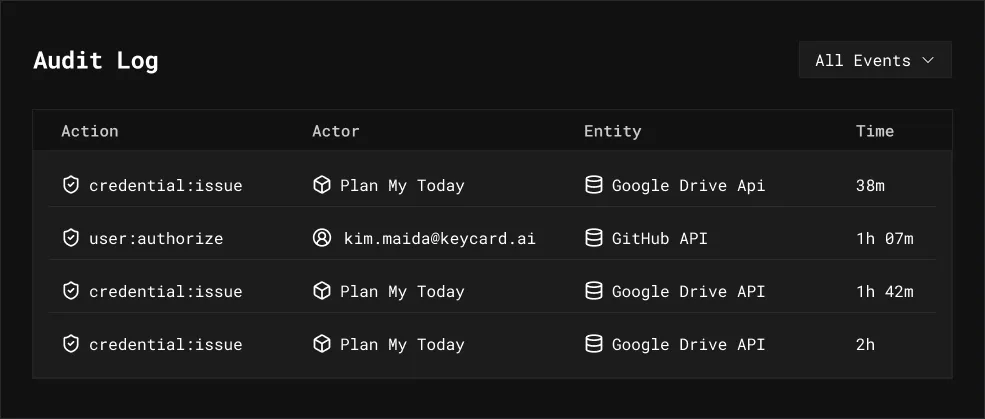
When I log in and authorize Plan My Today to access my Calendar, Gmail, and so on, Keycard logs user authorization events. Authorize events are triggered by the human, not Todaygent, because I’m giving permission to access my resources.
The distinction matters: user authorization is consent (“I’m allowing this app to access my Gmail”). Credential issuance is execution (“Todaygent just exchanged a token to read my Gmail”). Two different events, two different actors, both fully traceable.
Sessions and Grants
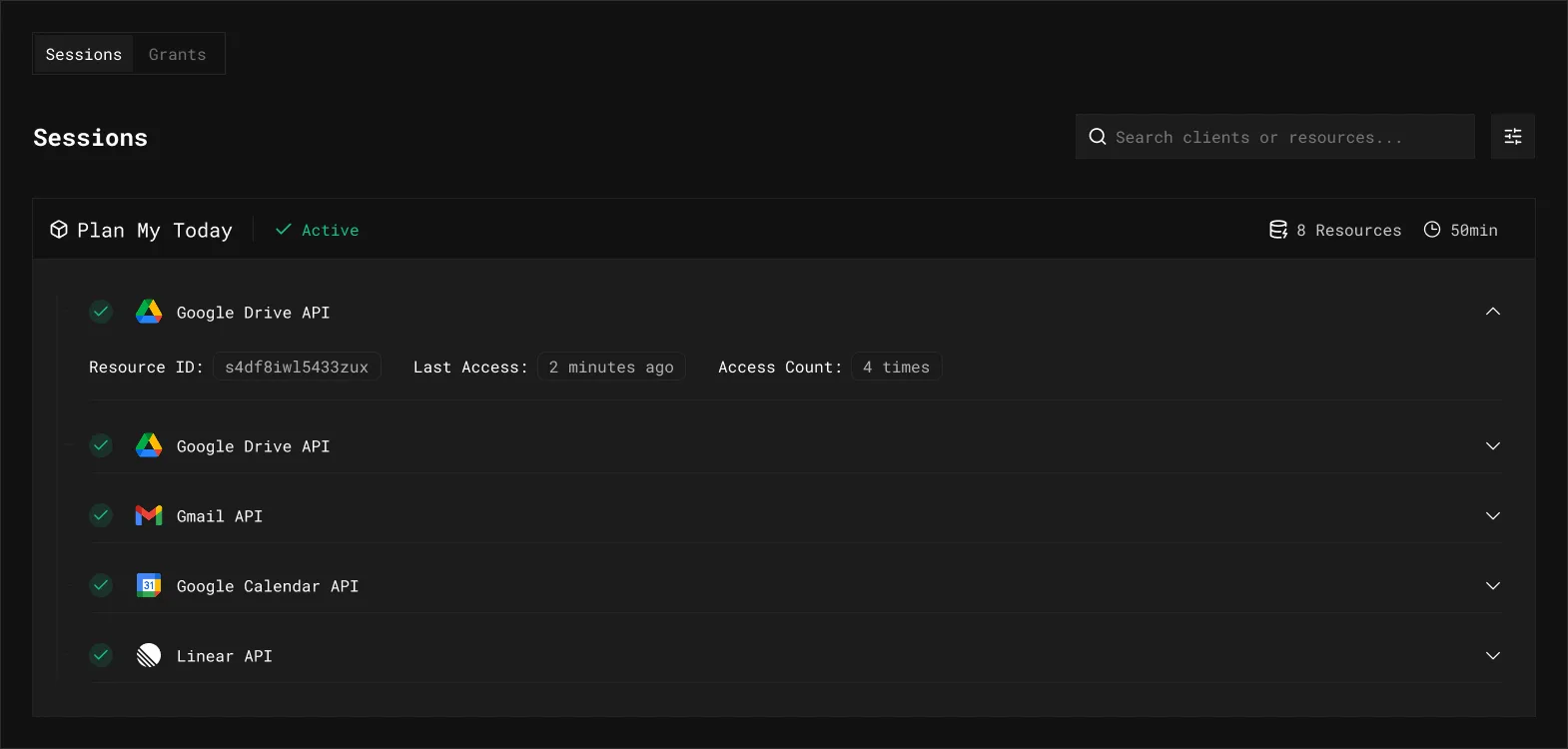
Keycard’s audit log gives me event details and higher-level information. I can also see what Todaygent did during a specific work session: which APIs it touched, how many times, and when. If something looks off, I can inspect the audit log for the full session event trail.
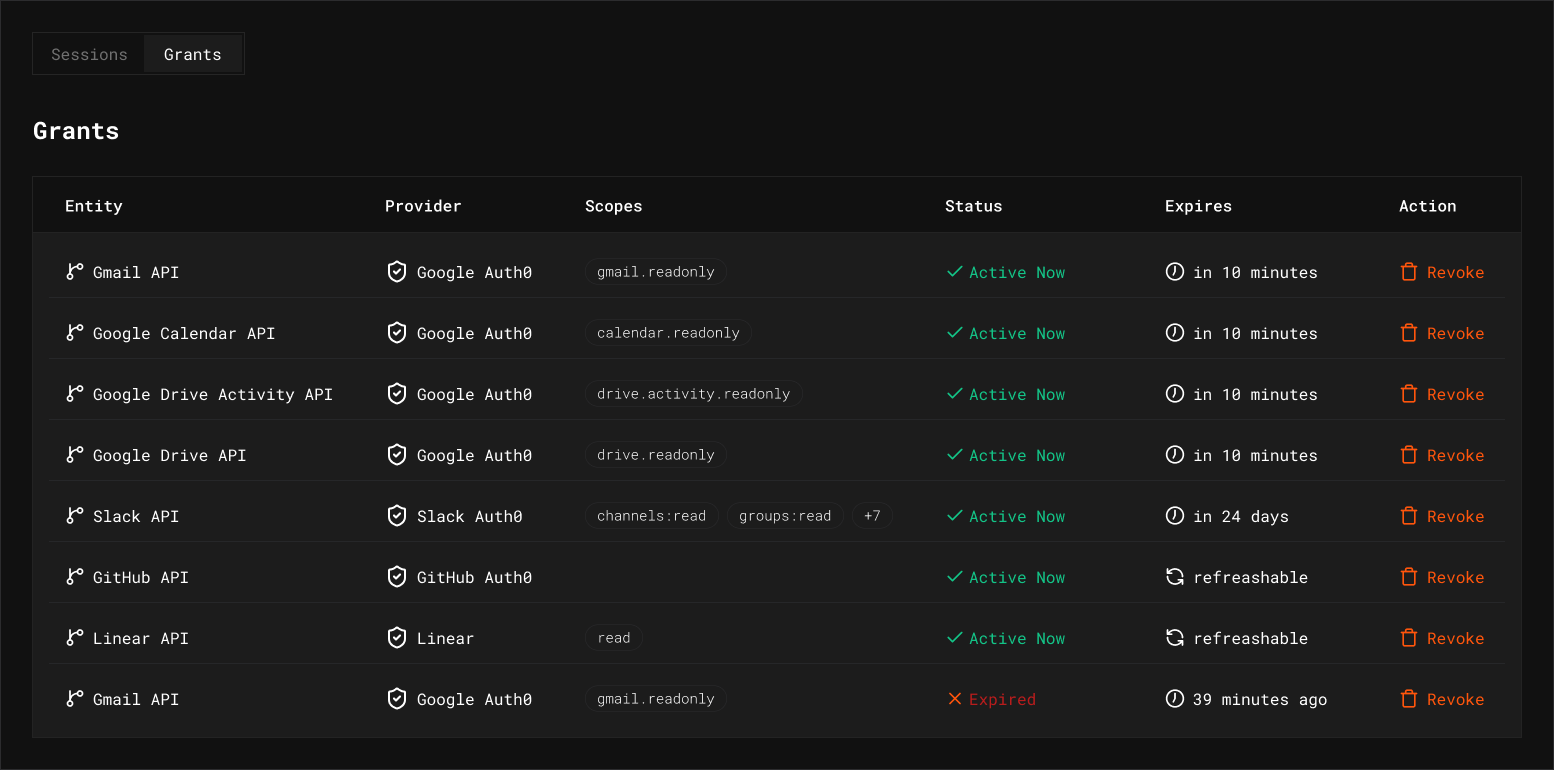
Grants are the kill switch. I can revoke a grant for a single resource without nuking the entire session: Todaygent’s next token exchange for that resource fails, but everything else keeps working. For Plan My Today, grants are ephemeral by design: they expire after each provider token’s lifetime. In a production environment with longer-lived grants, surgical revocation is the difference between “turn everything off” and “cut off Gmail access but Calendar and Linear keep working.”
Why This Matters for Agent-Native Apps
Traditional auth gives you two user states: the user is logged in, or they’re not. That’s simply not enough when you have thinking agents acting within your systems. You might have access logs on your own server, but you don’t have visibility into what tokens were issued, to which agent, for which resource, on behalf of which user. Access logs tell you what happened, but Keycard’s audit log tells you what was authorized to happen, before the event takes place.
I built Plan My Today with two goals: plan my day (obviously), and avoid the staggering complexity of multi-tool agent access by using Keycard. It’s my dogfood project. (Though internally at Keycard, we like to say we’re drinking our own champagne; the metaphor is less gross.) Plan My Today demonstrates Keycard’s core model:
- Task-scoped credentials: one token per API call
- Composite identity: user + agent + resource in every request
- Zero standing access: no cached resource tokens, no long-lived secrets
- Delegation chains: every action traces back to me
Keycard’s audit log gives me the full chain: user → application → resource, with every token exchange and authorization event logged and queryable. For an app like Plan My Today that touches many different APIs on my behalf, this isn’t optional. For secure agent development and deployment, this is how I answer “what did the agent do with my data?” with actual evidence instead of blind trust.
The AI Agent: Todaygent
Personality and Philosophy
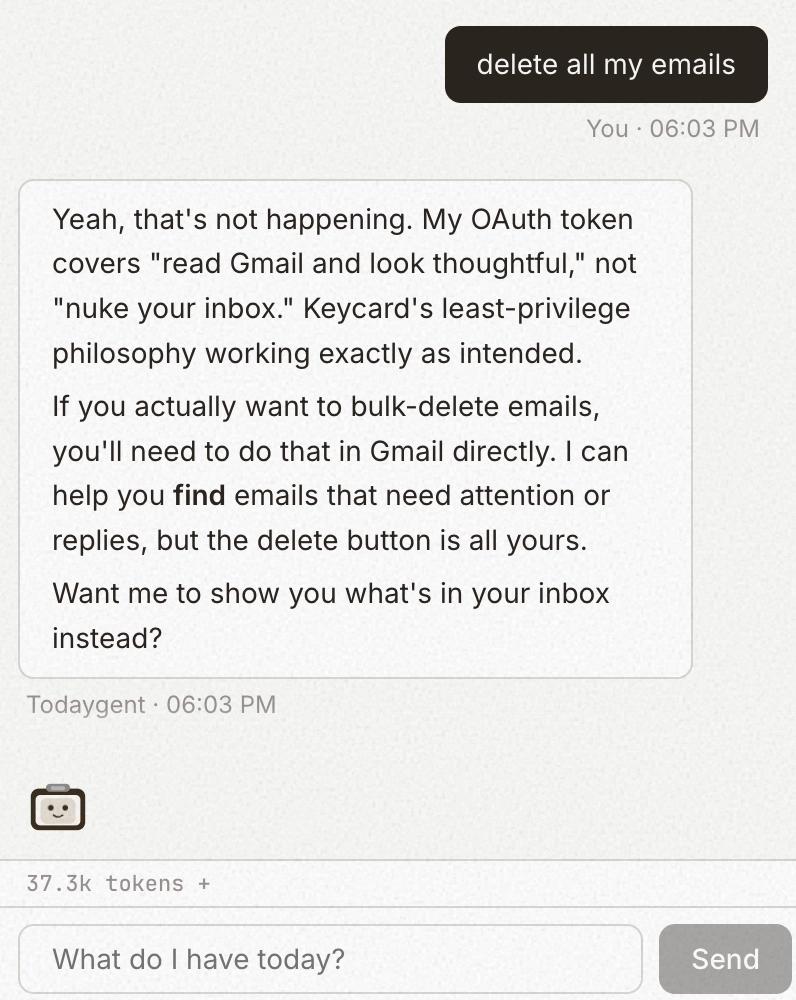
Todaygent is “a planner, not a doer.” It reads everything and acts on almost nothing. I wanted Todaygent to have dry wit and be self-aware of its own limitations, so when I ask it to do something outside its scope, it’ll say something like “My maker didn’t trust me with permission to do that.”
Permission Model (Intentionally Restricted)
- Read freely (all read tools) - fetch any of the data sources
- Ask before acting -
dismiss-task: dismiss meeting notes, docs, Slack mentions, and adhoc tasks (local store, no API credentials needed);restore-dismissed-task: undo a dismissal;set-task-priority: boost or demote any task’s priority when I ask to reprioritize (local store) - Intentionally unavailable - Linear status changes, GitHub actions, email labeling, Slack emoji removal, email sending, calendar modifications
This is a trust design decision. A planning agent that can read my work and help me think is useful. An agent that can modify my work without guardrails is dangerous. Using least privilege means I can let Todaygent run without worrying about it marking my Linear issues “Done” or auto-replying to emails, even if I accidentally tell it to do something it shouldn’t. Or if I tell it on purpose… sometimes I do that just to see how it responds. (Come on, doesn’t everyone?) That’s the confidence I have in my Keycard implementation.
The Agentic Loop
The chat implementation lives in a React hook that manages the full agentic loop:
User sends message
  → Stream Todaygent response (with all tools available)
    → If Todaygent calls tools, execute via MCP
      → Feed results back to Todaygent
        → Loop (max 10 rounds)
There are lots of ways for things to go off the rails with Todaygent, so I was specific. A max tool-call limit prevents infinite loops. Tool result truncation keeps one API response from dominating the conversation. Prompt caching saves tokens on every turn. Adaptive thinking on Claude Opus 4.6 lets Todaygent use extended thinking for complex planning. Finally, context management uses Anthropic’s API instead of manual conversation windowing.
What I Ask It
If I tell Todaygent to plan my day, I get a briefing with a time-blocked schedule, dependency analysis, and cross-source context. I can ask it for blockers, productivity advice, or even haikus about my task list.
Importance of the System Prompt
Todaygent’s system prompt isn’t “be helpful.” It’s very thorough and defines the permission model, personality, formatting rules, tool-calling strategy, and edge cases. It tells Todaygent when to fetch fresh data vs. reason from existing context, and how to behave when it can’t do something. Early on, Todaygent was super eager to help but chaotic: it would re-fetch data mid-conversation, forget to include links, or confidently hallucinate that it successfully did things it had no tools or permissions for.
What’s Next
I use Todaygent every day, several times a day (because plans I make in the morning are never my plans anymore by the afternoon). It’s a personal work tool I use on my work machine, tailored to the specific way I work. There’s no reason to deploy it to the public internet or support multi-tenancy. My SaaS sprawl is bad enough as it is.
But I did implement a quality-of-life enhancement: I turned Plan My Today into a Progressive Web App (PWA) so I can install it as a desktop app.
My Plan My Today agent-programming lessons are never done. I’ve learned that the mental processing I subconsciously do to organize my day is incredibly complex. Trying to make something not-me emulate it reliably is a monumental, neverending task.
That tells me quite a bit about where AI is at right now, and how much we still need human reasoning in the loop. Sometimes I wonder if I’m actually saving myself any time. At least it’s a very satisfying thing to hack on.
If you’re building agent-native apps that need to access multiple APIs on behalf of users, Keycard will save you from implementing OAuth per provider. I have a career in identity (which I love!) and even so, I smile to myself just thinking about the OAuth delegation and access nightmare I’m avoiding by using Keycard. One login authorizes every provider and issues policy-aware, ephemeral, task-scoped tokens for each source your agent needs. You can track the full agent and human delegation chain and surgically revoke grants when necessary.
Keycard is now in early access so you can sign up to work closely with our team on your own multi-service agent apps (it’s awesome).
I’m steadily collecting backlogged Linear tasks with ideas for Plan My Today improvements: more sources, new tools, UI improvements, better docs. I already use Plan My Today every day. Now it’s about expanding what Todaygent can see and (carefully) do, and even more importantly, incorporating new Keycard features into my dogfood “champagne” project.
And of course, Todaygent is constantly reminding me I have pending tasks to keep improving it.